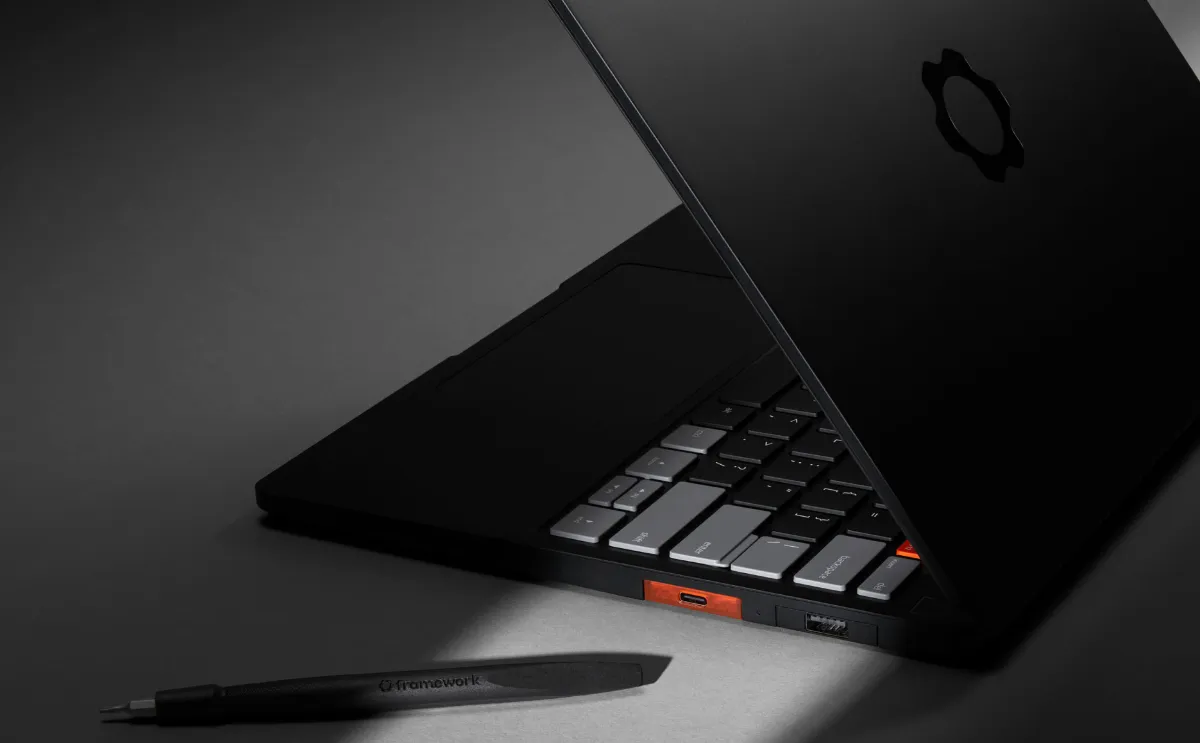
For years, Linux users and open source lovers have had one big wish: a laptop that feels as premium as a MacBook Pro but gives you full control over your hardware, your software, and your data. That wish just came true. Framework, the company that started the repairability revolution in personal computers, has just announced the Framework Laptop 13 Pro. The most ambitious laptop the company has ever built.
This is not a small update. This is Framework starting fresh.
What Is the Framework Laptop 13 Pro?
The Framework Laptop 13 Pro is the first complete ground-up redesign of the Framework Laptop 13 since the original launched back in 2021. For five years, Framework made incremental improvements. New mainboards, better processors, upgraded ports. But the core chassis stayed the same.
Now everything has changed.
The new Framework Laptop 13 Pro comes with a CNC machined aluminum body, a fully custom 13.5 inch touchscreen display, a haptic touchpad, a larger 74 WHr battery, Intel Core Ultra Series 3 processors, LPCAMM2 memory, Wi-Fi 7, PCIe 5.0, and Ubuntu pre-installed as a first class option. It ships in June 2026, with prices starting at $1,199 for the DIY Edition and $1,499 for the pre-built version.
Let that sink in. A premium, fully repairable, Linux-ready laptop at under $1,500. The MacBook Pro costs twice that and you cannot even replace the battery yourself.
Full Specifications at a Glance
| Feature | Detail |
|---|---|
| Processor | Intel Core Ultra Series 3 (Ultra 5, Ultra X7, Ultra X9) |
| GPU | Intel Arc B390 / B370 (integrated) |
| RAM | Up to 64GB LPCAMM2 at 7,467 MT/s |
| Display | 13.5 inch, 3:2, 2880 x 1920, 30 to 120 Hz, touch |
| Brightness | Up to 700 nits |
| Battery | 74 WHr |
| Battery Life | Up to 20 hours (Netflix 4K streaming) |
| Charging | 100W GaN charger included |
| Storage | PCIe Gen 5 NVMe (up to 14,000 MB/s) |
| Connectivity | Wi-Fi 7, 4x Thunderbolt 4 |
| Weight | 3.09 lbs / 1.4 kg |
| Thickness | 15.86 mm |
| OS Options | Ubuntu pre-installed, Windows, or your own Linux distro |
| DIY Starting Price | $1,199 |
| Pre-built Starting Price | $1,499 |
| Shipping | June 2026 |
The New Design: Built from the Ground Up
Framework has always been known for being upgradeable and repairable. But if there was one criticism people had about the older Framework Laptop 13, it was that the chassis felt a little too plain. A little too plasticky. Not the kind of laptop you pull out in a coffee shop and feel proud of.
The Framework Laptop 13 Pro fixes that completely.
The new body is machined from 6000-series aluminum. That is the same class of material used in high-end consumer electronics. It gives the laptop a rigid, premium feel that older Framework units simply did not have. The outer dimensions remain the same as before 15.86 mm thick, so existing Framework 13 users can retrofit upgrade parts to their current machines without buying a completely new device.
The new laptop ships in two colors: Graphite (new for 2026) and Silver (for those upgrading from an older Framework 13). The Expansion Card latch has also been redesigned for a simpler, more satisfying experience, a small detail that everyday users will absolutely notice.
What Can Existing Framework Users Upgrade?
This is one of the most exciting parts of the story. If you own any Framework Laptop 13 going back to the original 11th Gen Intel model, you can upgrade to Pro parts piece by piece. That includes the top cover, the bottom cover, and the new haptic input cover.
Want the bigger 74 WHr battery? You will need the new bottom cover and haptic input cover too, since the geometry changed to fit the larger battery cell. But the key point is: you do not have to throw away your old laptop. Framework is honoring its promise of longevity in a way no other laptop company does.
Intel Core Ultra Series 3: What It Means for You
The Framework Laptop 13 Pro is powered by Intel Core Ultra Series 3 processors, also known as Panther Lake. This is the generation of Intel chips that brings together serious performance and serious efficiency in a way that previous Intel mobile chips could not match.
You have three processor options:
Intel Core Ultra 5: For everyday productivity, coding, writing, and light creative work. The most affordable configuration.
Intel Core Ultra X7 (358H): The sweet spot. Great balance of performance and battery life. This is the chip Framework used in their own battery life testing.
Intel Core Ultra X9: The top of the line. Maximum performance for developers, power users, and professionals running heavy workloads.
All three configurations come with the Intel Arc B390 or B370 integrated GPU, which is a major step up from previous Intel integrated graphics. These GPUs can handle light gaming, video editing, and even some AI acceleration tasks locally on device.
Beyond raw speed, the Core Ultra Series 3 brings two firsts for Framework laptops. This is the first time a Framework product supports PCIe 5.0, the fastest storage interface available today, enabling NVMe drives that read at up to 14,000 MB/s. It is also the first Framework laptop with Wi-Fi 7, which delivers dramatically faster wireless speeds and lower latency compared to Wi-Fi 6E.
The Battery Story: 20 Hours Is a Real Number
If you have followed Framework laptops over the years, you know that battery life has been their Achilles heel. The original Framework Laptop 13 was a joy to use but required you to stay close to a power outlet. That era is over.
The new 74 WHr battery is 22% larger than the battery in the previous Framework Laptop 13. Framework claims the Laptop 13 Pro can stream Netflix in 4K for over 20 hours on a single charge that is 12 hours more than the previous generation. That is not a small improvement. That is a transformation.
To power the bigger battery faster, Framework now ships a 100W GaN charger in the box instead of the old 60W adapter. Faster charging and better battery life in the same package.
Framework also promises the battery will retain at least 80% of its original capacity after 1,000 charge cycles. That is about three years of daily use before you even start to notice any degradation. And when the battery does eventually wear out? You replace it yourself in minutes. No appointment at a store. No shipping it away. No paying a technician.
The Display: Framework’s First Fully Custom Screen
Every display Framework used before was sourced from existing panel suppliers and adapted to their laptops. The Framework Laptop 13 Pro changes that. This is the first fully custom-designed display in the history of Framework laptops.
The results speak for themselves.
The 13.5 inch screen uses a 3:2 aspect ratio, the same tall format that Microsoft Surface users love and that makes a huge difference when reading documents, writing code, or browsing the web. The resolution is 2880 x 1920, which is crisp and sharp at normal viewing distances. The panel supports a variable refresh rate from 30 Hz to 120 Hz, saving power during low-activity tasks while still delivering smooth scrolling and animations when needed.
Brightness reaches up to 700 nits, which is excellent for indoor use and comfortable even near a window. The display also has an anti-glare coating to reduce reflections.
Most importantly: this is the first touchscreen ever on a 13-inch Framework Laptop. You can use it as a standard laptop, or reach up and interact with the screen directly. This adds a new dimension to the user experience that was simply not available before.
LPCAMM2 Memory: The Future of Laptop RAM
One of the biggest technical innovations in the Framework Laptop 13 Pro is its use of LPCAMM2 memory modules. If you are not familiar with this technology, here is why it matters.
Traditional laptop RAM uses SO-DIMM slots, which are large and take up significant space inside the chassis. Newer ultra-thin laptops have been soldering RAM directly to the motherboard, which saves space but kills upgradability. LPCAMM2 is the solution to both problems.
LPCAMM2 modules are compact (much smaller than SO-DIMM), they use less power, they are faster, and they are user-replaceable. The Framework Laptop 13 Pro ships with LPCAMM2 in three capacity options: 16GB, 32GB, and 64GB, with speeds up to 7,467 MT/s. Framework CEO Nirav Patel has confirmed that higher capacity modules will be available in the future.
This is genuinely important. No other mainstream laptop at this price gives you this combination of speed, capacity, efficiency, and replaceability in a single memory solution.
The one catch: LPCAMM2 modules are not yet widely available from third-party retailers. Framework plans to stock them in their own online store, which is an important safety net for buyers.
Haptic Touchpad: Finally
One area where MacBooks have long felt superior is the touchpad. The Force Touch haptic feedback on Apple laptops gives a satisfying, precise click that does not physically move instead, the vibration motor creates the sensation of a click wherever you press.
The Framework Laptop 13 Pro now has that. The new haptic touchpad is sourced from LiteOn, the same vendor that makes Framework’s existing mechanical touchpads. The input cover also includes the keyboard, which retains the same 1.5 mm key travel that Framework users have always appreciated. Haptic feedback makes the touchpad feel more precise and responsive, and it also requires less physical depth inside the chassis, which is part of how Framework found room for the bigger battery.
Ubuntu Out of the Box: A Big Deal for Linux Users
Here is one of the most meaningful announcements from Framework’s Next Gen event. Until now, Framework only offered Windows on its pre-assembled laptops. If you wanted Linux, you had to buy the DIY edition and install it yourself.
The Framework Laptop 13 Pro changes that. For the first time, you can buy a pre-built Framework laptop with Ubuntu already installed, developed in partnership with Canonical. You do not have to touch a terminal to get a working system. You just open the box and start working.
This is Framework deliberately reaching out to the Linux community and saying: you are our people. We built this for you.
You can still install any Linux distribution you prefer Fedora, Arch, Debian, Pop OS, whatever you like. You can also install Windows if you want. The choice is yours. But for the first time, Linux users do not have to do extra work just to get started.
The one caveat Framework notes is that Dolby Atmos audio processing has not yet come to Linux that feature currently requires Windows. This is a minor point for most Linux users, but worth knowing if great speakers are a priority for you.
Framework Laptop 13 Pro vs MacBook Pro: How Do They Compare?
People are calling this the MacBook Pro for Linux users, and that comparison is worth examining seriously.
The MacBook Pro 14 with M5 starts at $1,999. It has outstanding performance, excellent battery life, and a beautiful display. But the RAM is soldered to the board. The battery requires professional tools to replace. You cannot upgrade the storage after purchase. And it runs macOS, which means no root access, no real system customization, and increasing restrictions over time.
The Framework Laptop 13 Pro starts at $1,199 in DIY form and $1,499 pre-built. The battery is user-replaceable in minutes. The RAM is LPCAMM2 and can be upgraded. The storage uses a standard NVMe slot. You can install any operating system. And Framework commits to selling spare parts for years.
Is the Framework faster than the MacBook Pro M5? No. Apple’s M5 chip is genuinely impressive and beats Intel in raw performance benchmarks. But for a developer, a sysadmin, a security researcher, or anyone who values control and longevity over raw speed, the Framework is the better laptop in every way that matters.
New Accessories and the Framework Ecosystem
Alongside the Laptop 13 Pro, Framework announced several new products at their Next Gen event.
New Laptop Sleeve: A premium sleeve designed specifically for the Laptop 13 Pro.
Keyboard with Built-in Touchpad: Designed for home theater PCs and headless server setups. A great companion for the Framework Desktop.
10 Gbps Expansion Card: A new networking expansion card that gives you wired internet at 10 gigabits per second. A serious upgrade for power users.
Framework Laptop 16 Updates: The bigger sibling of the 13 gets single-piece haptic touchpad inputs, new keyboard options, and a new Ryzen 5 processor configuration for better value. It is also getting an OCuLink developer kit that lets you connect desktop-class graphics cards with up to 128 Gbps of bidirectional throughput bypassing the overhead of Thunderbolt entirely. This is not a product for casual users, but for enthusiasts who want desktop GPU performance in a laptop, it is a remarkable option.
Pricing and Availability
The Framework Laptop 13 Pro launches in June 2026. Here is how the pricing breaks down:
DIY Edition starting at $1,199 – You provide your own RAM, storage, and operating system. Best for experienced users who already have parts or want maximum control.
Pre-built configurations starting at $1,499 – Includes memory, storage, and Ubuntu pre-installed. Best for people who want a ready-to-use system immediately.
Framework’s marketplace will stock LPCAMM2 memory modules directly, which is important since these are not yet widely available elsewhere.
Why the Framework Laptop 13 Pro Matters
The Framework Laptop 13 Pro is not just a good laptop. It is a statement.
It says that you do not have to choose between premium build quality and the freedom to repair and upgrade your own machine. It says that Linux is not a second-class operating system for laptop users. It says that a laptop can last five years or more when the company designing it commits to backward compatibility and spare parts.
In a world where most laptop makers treat your device as a sealed box that you replace every two or three years, Framework is building something different. The Laptop 13 Pro is the most compelling version of that vision yet.
If you use Linux, or you want to, this laptop deserves your serious attention.
Frequently Asked Questions (FAQs)
When does the Framework Laptop 13 Pro ship?
Framework plans to begin shipping the Laptop 13 Pro in June 2026.
What is the starting price of the Framework Laptop 13 Pro?
The DIY Edition starts at $1,199. Pre-built configurations with Ubuntu pre-installed start at $1,499.
Does the Framework Laptop 13 Pro come with Linux pre-installed?
Yes. For the first time in Framework’s history, you can buy a pre-built configuration with Ubuntu installed out of the box, developed in partnership with Canonical. You can also install any other Linux distribution, Windows, or another OS.
What processors are available in the Framework Laptop 13 Pro?
The Laptop 13 Pro is available with Intel Core Ultra 5, Core Ultra X7, and Core Ultra X9 processors from the Core Ultra Series 3 (Panther Lake) family. Existing AMD Ryzen AI 300 mainboards are also supported.
What is LPCAMM2 and why does it matter?
LPCAMM2 is a new type of laptop memory module that is compact, fast, power-efficient, and crucially, user-upgradeable. The Framework Laptop 13 Pro supports up to 64GB of LPCAMM2 RAM running at 7,467 MT/s. Unlike soldered RAM found in most thin laptops, you can replace or upgrade LPCAMM2 modules yourself.
How long is the battery life on the Framework Laptop 13 Pro?
Framework claims up to 20 hours of Netflix 4K streaming on a single charge, which is 12 hours more than the previous generation Framework Laptop 13. The laptop comes with a 74 WHr battery and a 100W GaN charger.
Can I upgrade an older Framework Laptop 13 with Pro parts?
Yes. Owners of any Framework Laptop 13 (going back to the original 11th Gen Intel model) can upgrade individual parts including the top cover, bottom cover, and haptic input cover. To get the larger 74 WHr battery, you will also need the new bottom cover and haptic input cover due to design changes.
Is the Framework Laptop 13 Pro display a touchscreen?
Yes. The 13.5 inch, 2880 x 1920, 3:2 display supports touch input. This is the first touchscreen on a 13-inch Framework Laptop. The display also supports a variable refresh rate from 30 to 120 Hz and reaches up to 700 nits of brightness.
Does the Framework Laptop 13 Pro support PCIe 5.0 and Wi-Fi 7?
Yes. This is the first Framework laptop to support both PCIe Gen 5 NVMe storage (up to 14,000 MB/s) and Wi-Fi 7.
Does Dolby Atmos work on Linux on the Framework Laptop 13 Pro?
Not yet. Framework notes that Dolby Atmos audio processing is currently only available on Windows. Linux users will still get the new, improved speakers but without the Dolby Atmos processing layer.
What colors does the Framework Laptop 13 Pro come in?
The Laptop 13 Pro is available in a new Graphite color (new for 2026) and the existing Silver option. Upgrade parts for existing Framework Laptop 13 owners are available in Silver.
The Framework Laptop 13 Pro is scheduled to ship in June 2026. Follow Framework’s website at frame.work for pre-order availability and configuration details